All apps
Streaming
MIMO
Mirror your Android screen to your laptop, ready for streaming.
Coming soonmacOSWindowsFree
Coming soon
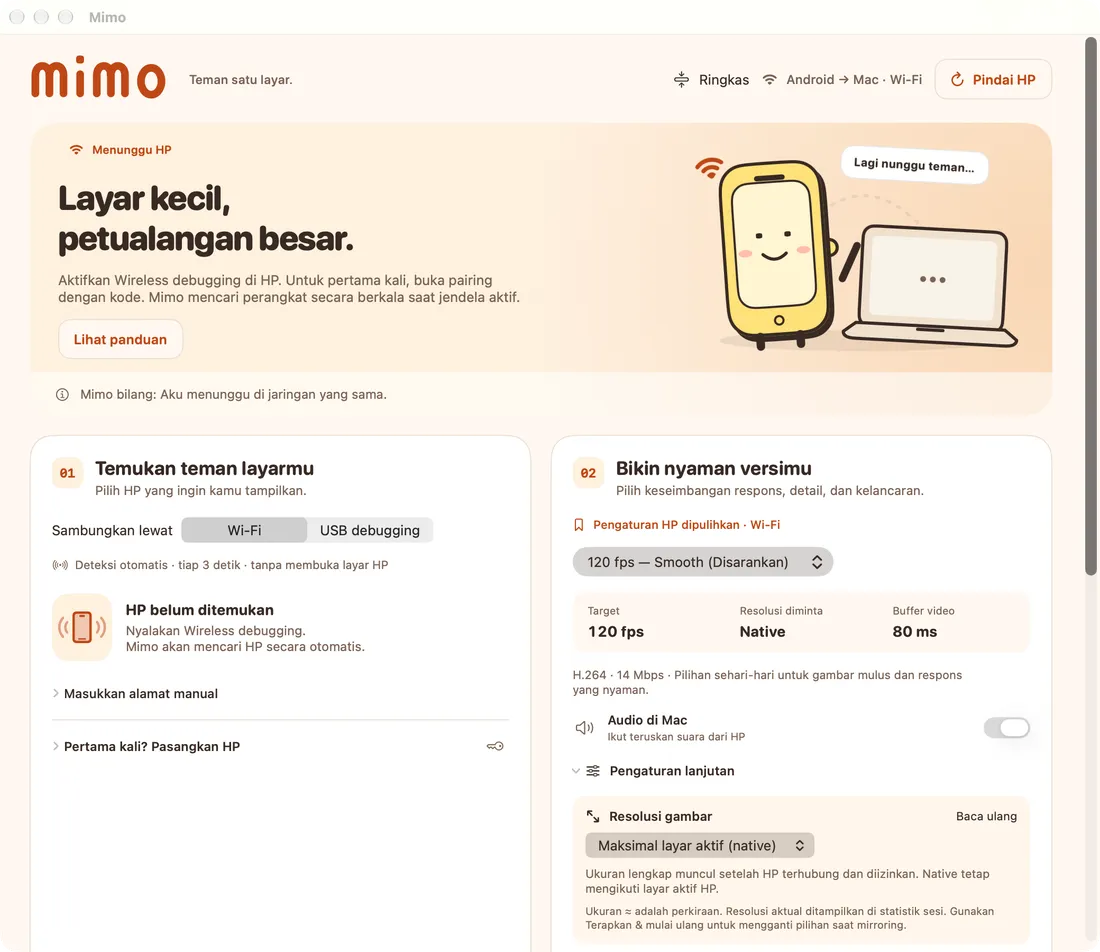
Mobile game streamers need an easy way to put their phone screen on a laptop and capture it in OBS or another streaming app. MIMO connects an Android phone to a Mac or Windows PC over a cable or Wi-Fi, and keeps the picture smooth.
Features
- USB or Wi-Fi: use USB debugging, or cable-free Wireless Debugging on Android 11 and up. Wi-Fi pairing and phone discovery happen automatically.
- Up to 120 fps: five ready-made profiles, from lowest latency and smooth 120 fps to high detail and a 60 fps fallback.
- Adjustable resolution and audio: choose resolution up to native, and tune audio response (fast, balanced, or stable).
- 20-second performance test: MIMO measures FPS and skipped frames, then suggests a resolution and bitrate that fit.
- Record and screenshot: record the session to MP4 while mirroring, or grab a screenshot in one click.
- Automatic reconnect: if the connection drops or the phone’s IP changes, MIMO reconnects to the same phone.
- Mimo helps: step-by-step guidance when USB permission, pairing, or the connection goes wrong.
- Can turn the phone screen off while mirroring to save battery.
For streamers
Open the MIMO window and add it as a Window Capture source in OBS. Use the low-latency profile for competitive games, or smooth 120 fps for laid-back content.
Status
MIMO for macOS is up and running; the Windows version is in Preview. It supports Android phones (not iPhone yet). Video and control are powered by the open-source scrcpy project.